
To configure the server you should click the options button, it's the one that looks like a folder with a hammer.
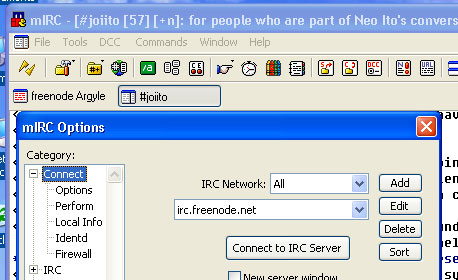
Once you are in the Options window, select Add to add the server.
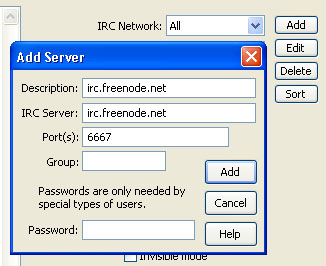
Once you have the Add Server window, type in irc.freenode.net as the description and irc server.
Complete the entry by hitting Add at the bottom. This will take you back to the main options window.
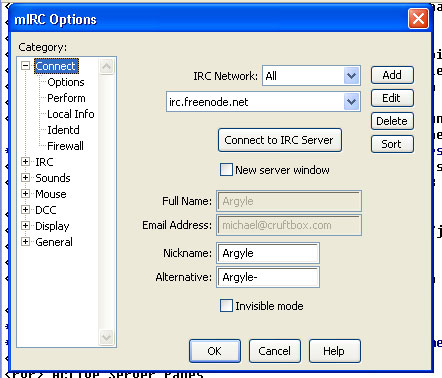
In this window, you can now enter your nickname. Once you've entered this info, hit OK. It is important to do this, because it saves the changes you have made.
From this point forth, you can simply open the Options box and you should see the irc.freenode.net loaded. Select Connect to IRC Server, and you shoudl connect to the freenode IRC network.
Once the MOTD has rolled by, type: /join #joiito
And you should be in!
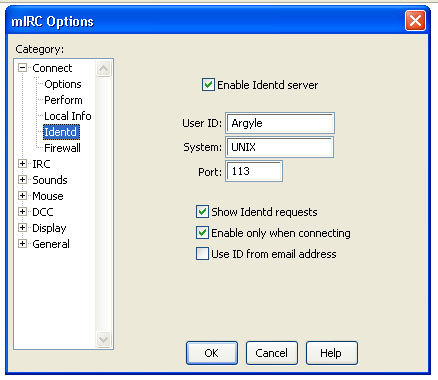
If you have trouble getting connected, you may have to turn on the identd feature if it's not on. To do this, select the Connect -> Identd window and click the checkbox for Enable Identd server and fill in your usual nickname.
If you have questions, ask here and I'll try to get back to you. - ![[WWW]](http://joi.ito.com/joiwiki/classic/img/moin-www.png) Argyle
Argyle